

A CAPA register filled from the records
LotWarden and EQAWarden keep a corrective and preventive action (CAPA) register for the nonconformities their own records find. It follows ISO 15189:2022 clause 8.7.
- An item opens from the record that found the problem
- It is filled from that record, so nothing is typed twice
- Each part is answered with a tick, a radio button or a short list
- Where the data can show whether the action worked, the data makes the effectiveness check
- Each decision is signed electronically by a named person
- An item stays on the register until it is closed with a signature
The gap an assessor finds twice
Many nonconformities are noted where they were found and go no further.
Where it is noted
- A rejected QC point gets a comment in the QC software
- A failed lot goes on a worklist
- An EQA review is signed as corrective action
What is often missing
- The cause, chosen and signed
- An owner and a due date for the action
- A check that the action worked
- A link to the same problem last year
What the register adds
- One item per nonconformity, opened from its record
- Seven parts that follow clause 8.7
- Overdue items and recurrences shown on the first page
- A record ready for the assessor
Four sources, each filled from its record
The laboratory sets once whether each source opens an item outright or proposes one. A proposed item is accepted or dismissed with a reason. A dismissed proposal is kept with its reason.
| Source | What opens an item | Filled in from the record |
|---|---|---|
| Lot held at the door LotWarden | A lot rejected on the register or in the acceptance record. A lot expired on arrival or failing its condition check. A Date in Use refused because the lot was not released. A lot released and then recalled. | Product, lot, expiry and supplier. The delivery note, the verdict and the receiver. |
| Weekly IQC review EQAWarden | A rejection rule breached in a signed week of internal QC. The rules that count are the laboratory's own. | Analyser, test, level and control. The rule and the week's figures. The results rejected in the week with the comments recorded against them. |
| EQA review EQAWarden | A survey outcome signed as corrective action. The Raise an item button on any reviewed result. | The survey, the result and the signed review. The findings, the lots in use and the analyte's chart. |
| By hand LotWarden | New item, for a nonconformity found elsewhere. | The date, the account signed in and a category. A reference from the laboratory's quality system is the one typed field, and it is optional. |
An item is worked with ticks
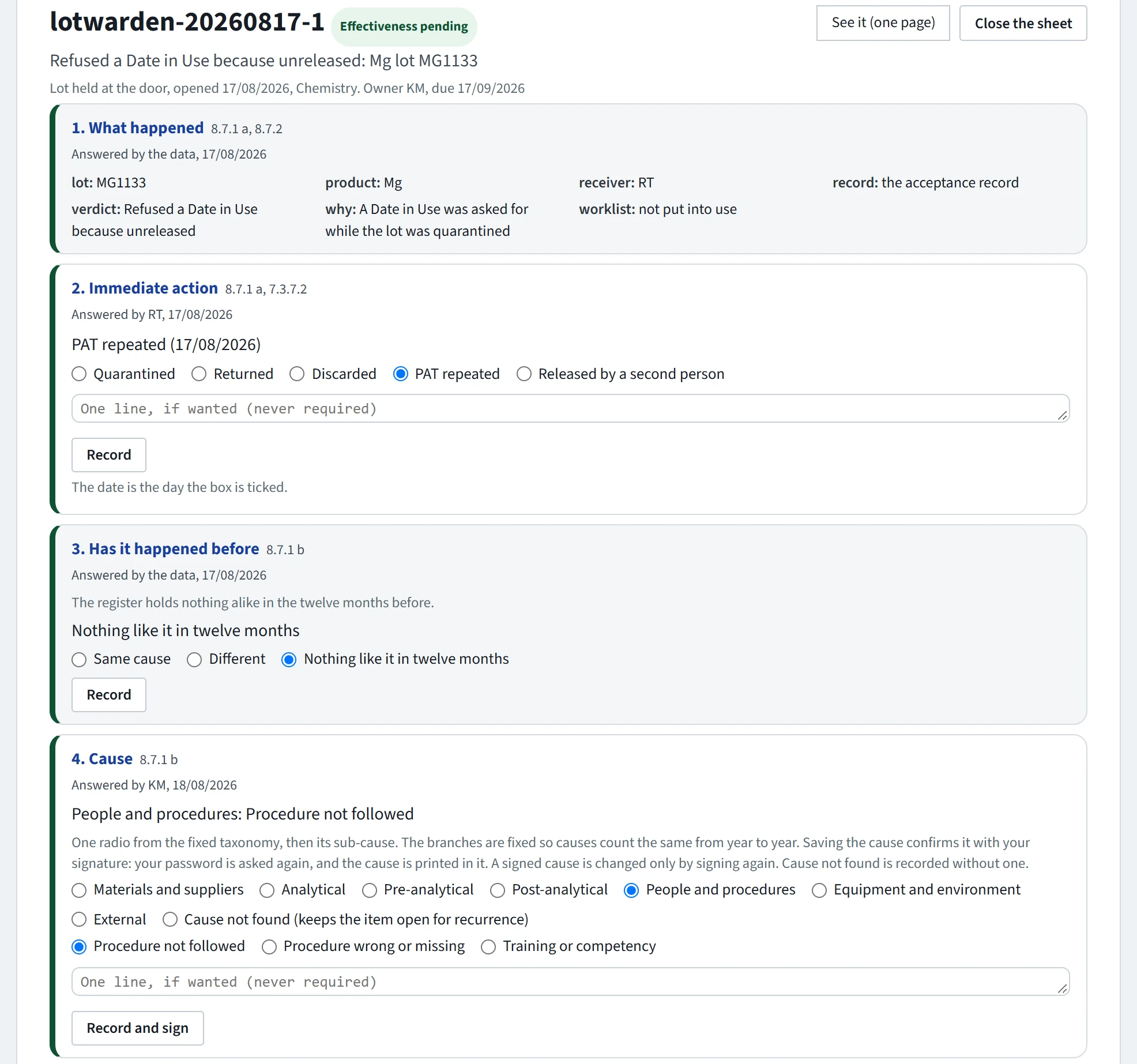
Each item is a sheet of seven parts. Each part names the clause it answers and who answered it: the data or a person.
Parts 1 to 4
- 1. What happened (8.7.1 a, 8.7.2): filled from the record.
- 2. Immediate action (8.7.1 a, 7.3.7.2): one radio button. The date is the day it is ticked.
- 3. Has it happened before (8.7.1 b): answered from the register's last twelve months.
- 4. Cause (8.7.1 b): a branch and a sub-cause from a fixed taxonomy. Causes count the same from year to year. Cause not found keeps the item open for a recurrence.
Parts 5 to 7
- 5. Corrective action (8.7.1 c): ticks from the standard actions for the cause's branch. An owner and a due date are filled in.
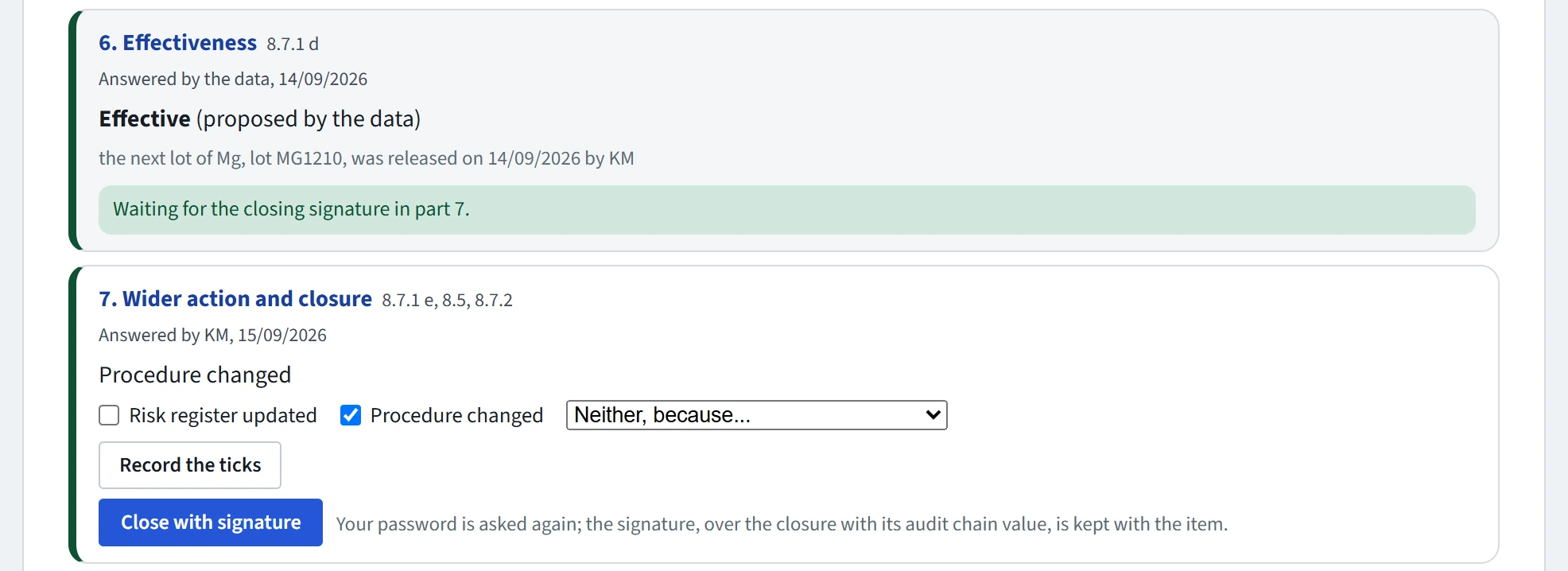
- 6. Effectiveness (8.7.1 d): made by the data where it can see the result. A person confirms it with a signature.
- 7. Wider action and closure (8.7.1 e, 8.5, 8.7.2): ticks for the risk register and the procedure. The item closes with a signature.
- Free text is offered on every part and never required.
The evidence comes with the item
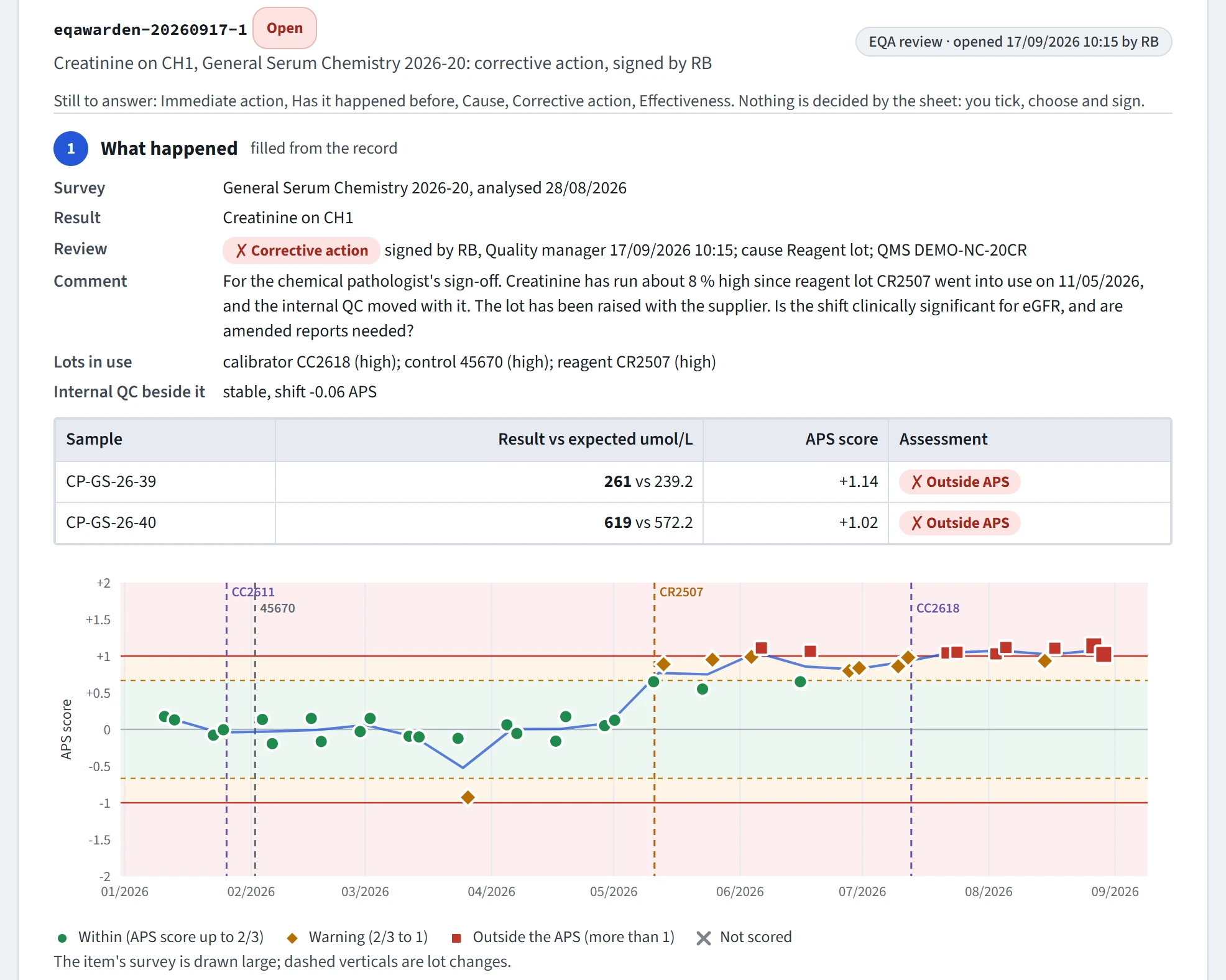
An item from EQAWarden carries what the review already found. The reviewer does not start from a blank page.
What happened
- The survey, the result and the signed review
- The lots in use and the internal QC beside the result
- The analyte's chart with each lot change marked
- For an IQC item: the week's figures and the rejected results with their comments
Has it happened before
- Answered from EQAWarden's own surveys of the twelve months before
- Each earlier survey with the same findings is listed
- Those near a lot change are counted
- The register is searched for an earlier item on the same analyte
The likeliest cause is checked first
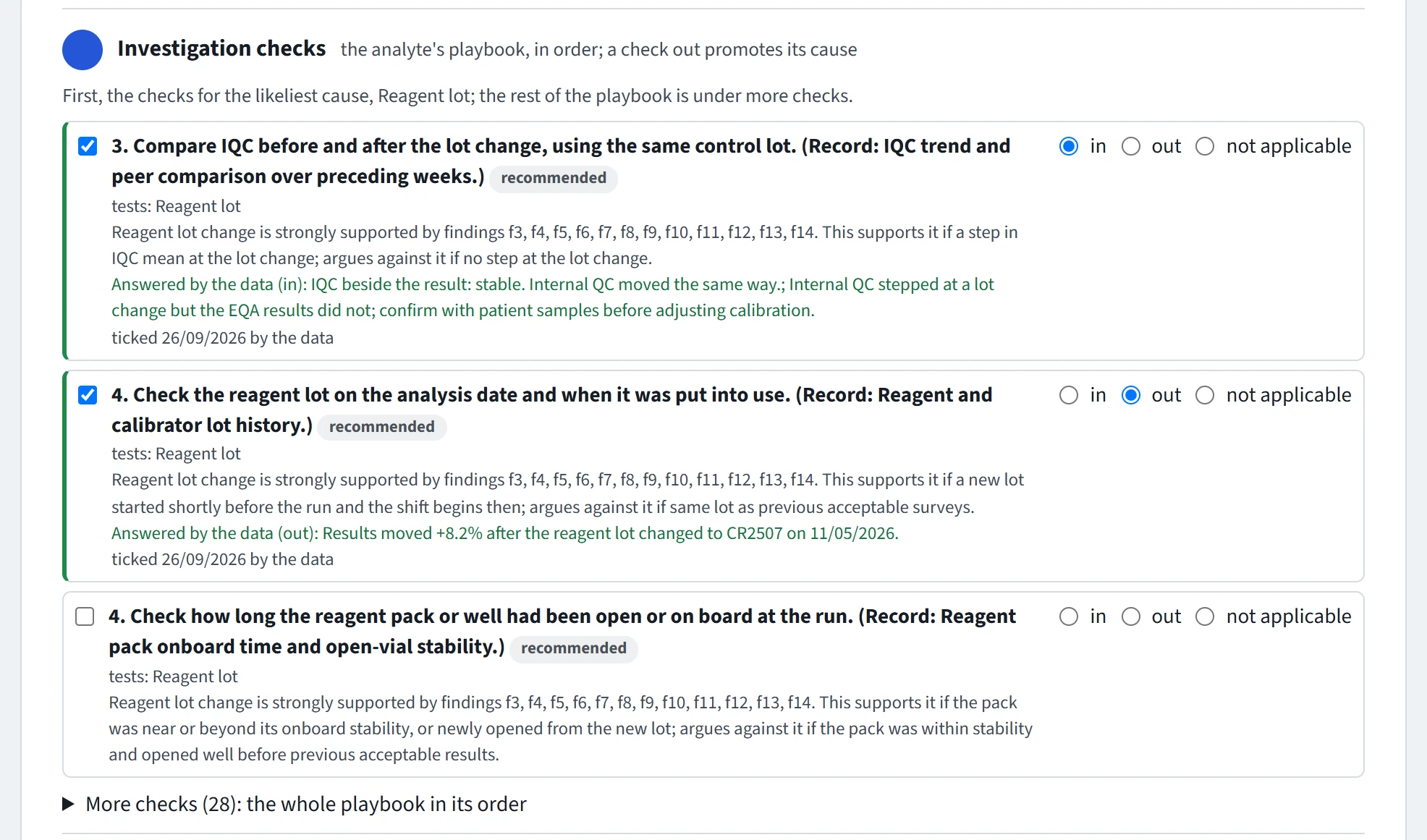
The checks follow the analyte's playbook. Those for the likeliest cause come first. The rest are folded under More checks.
- Each check is ticked with a result: in, out or not applicable
- Where EQAWarden's records can answer a check, the answer is filled in and marked as the data's
- A check marked out moves its cause up the ranking
- The reviewer chooses the cause and signs it
- For an IQC item the steps follow the rule type: random error first or systematic error first
- Nothing is decided by the sheet
The data checks whether the action worked
Clause 8.7.1 d asks whether the corrective action was effective. Where the records can show it, the programs propose the answer. A person confirms it with a signature.
What counts as effective
- A lot item: the next lot of the product is released or accepted
- A supplier error: the supplier's next three deliveries arrive without the same verdict
- An IQC item: the next four reviewed weeks pass without the same rule breached
- An EQA item: every sample in the next two surveys scores within its APS
- Procedure and training causes: the person answers after the due date
When it fails
- The cause is reopened with Cause not found offered
- The item counts as a recurrence
- The recurrence shows on the register's list
- A signed cause that is reopened keeps its signature with it
What is open, overdue and waiting
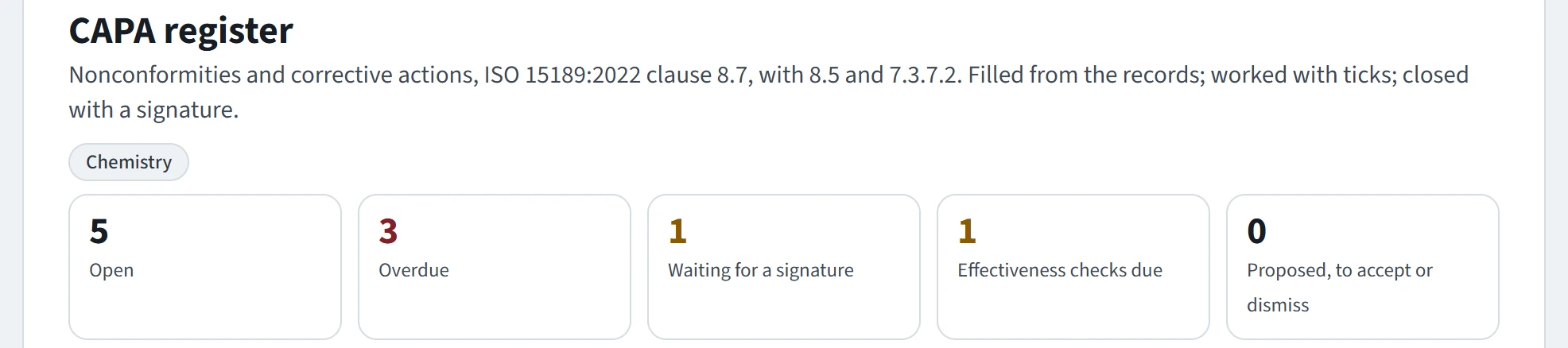
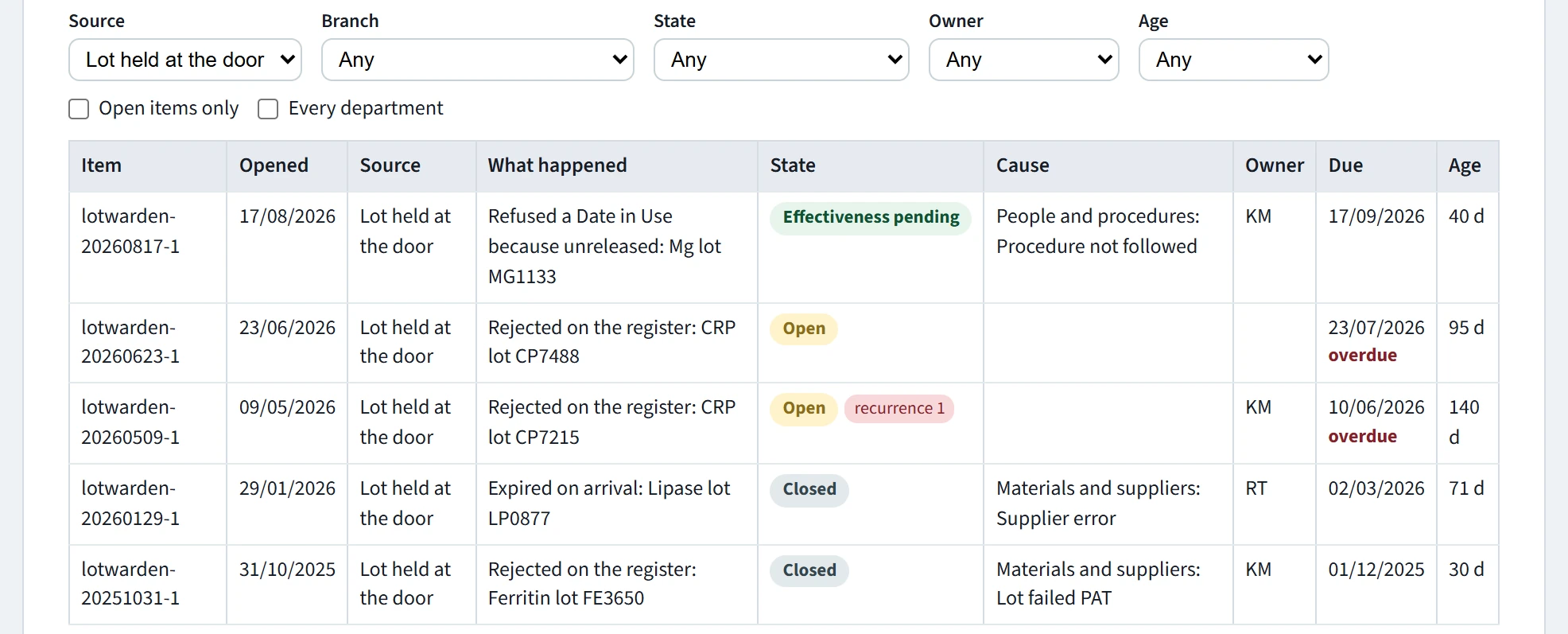
The register opens on five figures. Below them each item is one line with its source, state, cause, owner and due date.
On the page
- Figures: open, overdue, waiting for a signature, effectiveness checks due, and proposed
- Filters: source, cause branch, state, owner and age
- Flags: overdue and recurrence on each line
- Due dates default by source, from the day the action is recorded
Outputs
- The register and each item as a page to read and print
- A workbook for the laboratory's quality system, and CSV
- A CAPA register sheet in LotWarden's assessment pack
- The Excel files stay as the export
Each decision is signed
The signing points are the same named-account signatures used across both programs. The password is asked again for each one.
| Signing point | LotWarden | EQAWarden |
|---|---|---|
| Accepting or dismissing a proposed item | Signed | Signed |
| Confirming the cause | Signed | Signed |
| Confirming effectiveness | Confirmed by the closing signature | Signed |
| Closing the item | Signed, with the audit trail's chain value | Closed when LotWarden's closure is read back |
- A signed cause is locked. Changing it needs a new signature.
- The earlier signature is kept and shown as superseded.
- Every signature shows as the one four-line block: who, when, what it means and its check.
- Every change to an item is a line in its history and in the audit trail.
- Nothing is deleted. A closed item is final.
One register across LotWarden and EQAWarden
EQAWarden opens and works its own items. The register itself is LotWarden's, with the wider action and the closing signature.
EQAWarden to LotWarden
- Items pass over the link while the evidence feed is on
- On separate PCs they go as a file with a SHA-256 check file
- They arrive read only, with their signatures
LotWarden to EQAWarden
- The wider action ticks come back the same way
- So does the closing signature
- The item then closes in EQAWarden too
One owner per part
- Each part of an item has one owning program
- A program writes its own parts and never the other's
- The sheet shows which program owns each part
More: how the two programs link.
What the register is not
- It covers the nonconformities found in the programs' own records. It is not a quality management system.
- Incidents, complaints and the laboratory's wider quality records stay in its quality management system. The register's workbook can be taken into it.
- It holds no patient data.
- It suggests and the person decides. A suggested cause or a proposed effectiveness answer is not a decision until it is signed.
- It uses no generative AI, language model or AI service. The rules are predefined.
- LotWarden and EQAWarden are not affiliated with, endorsed by or certified by NATA or ISO. Using the register does not make a laboratory compliant.
Questions about the CAPA register
What is a CAPA register?
It is a list of nonconformities with what was done about each one. CAPA stands for corrective and preventive action.
- Each entry records what happened and the immediate action
- It records the cause and the corrective action
- It records whether the action worked
- It shows who decided each step and when
What does ISO 15189:2022 clause 8.7 ask of a laboratory?
Clause 8.7 covers nonconformities and corrective actions.
- React to the nonconformity and deal with its consequences
- Find its cause and whether it has happened before
- Take action in proportion to its effects
- Review whether the action was effective
- Update risks and the quality system where needed
- Keep records of each step
The register's seven parts follow that order. The standard leaves the method to the laboratory's own procedure.
Does it replace our incident or quality system?
No. It covers the nonconformities found in LotWarden's and EQAWarden's own records.
- Incidents and complaints stay in the laboratory's own systems
- An item raised by hand can carry that system's reference
- The register exports as a workbook for the laboratory's quality system
How much has to be typed?
Almost nothing. The item is filled from the record that opened it.
- Decisions are ticks, radio buttons or short lists
- Free text is offered on every part and never required
- An item raised by hand asks for a category and an optional reference
How is effectiveness decided?
Where the records can show the result, the data proposes it and a person signs.
- Lot items: the next lot is released or accepted
- IQC items: four reviewed weeks without the same rule breached
- EQA items: two surveys with every sample within its APS
- Procedure and training: the person answers after the due date
Does it work with only one of the two programs?
Each program opens and works its own items.
- LotWarden alone keeps the whole register and closes its items
- An EQAWarden item is confirmed effective in EQAWarden
- It then waits for LotWarden's closing signature
See the register on fictional data
Twenty minutes on a video call. A lot held at the door and an EQA result outside its APS each become an item, worked through to closure.