

EQA review that shows its working.
EQAWarden is offline decision support for reviewing RCPAQAP chemical pathology EQA results. It reads the myQAP survey report, scores every result against its APS, looks for the patterns that explain a deviation, and ranks the likely causes with the evidence for and against. It suggests; people decide. The outcome is the reviewer's, signed with initials in a hash-chained audit trail.
From the survey report to a signed review, in four steps.
Everything runs on one computer as a local web page. Nothing is sent anywhere, and nothing is stored until a person has seen it and confirmed it.
-
STEP 1
Import
The myQAP survey report PDF, results files, Bio-Rad Unity Real Time QC exports and LotWarden lot records. Everything is previewed before it is stored.
-
STEP 2
Score
Every result against its APS: the difference, the APS score and its zone (within, warning, outside), and how reliable the target is.
-
STEP 3
Find patterns
58 rules look for clerical slips, whole-vial shifts, trends, lot steps, IQC agreement, method-group effects and cross-analyte patterns.
-
STEP 4
Suggest, then sign
A suggested outcome, a plain summary and the recommended actions first; the ranked causes and their evidence behind arrows. The reviewer decides and signs with initials.
No AI, no guessing. The engine is deterministic: the same inputs give the same findings every time. Every flag shows its statistic, its threshold, the rule that fired and the reference behind it. Heuristic weights are labelled as heuristics, and wording scales with the evidence: "consistent with", "suggests", "insufficient evidence".
From the survey list to a signed review, in under two minutes.
Recorded from the real application on its fictional demo year, with the network guard on the whole time. Every result, lot and reviewer is fictional and marked DEMO. Silent, captioned, no sign-up to watch.
Captioned, no soundPrefer a live one? Book a walkthrough.
- 0:00OverviewWhat is waiting, what fell outside, what needs attention.
- 0:08SurveysFifty-two results placed by APS score.
- 0:24AssessmentSuggested outcome, actions, causes with their evidence.
- 0:51Analyte historyThe APS score over time, lot changes marked.
- 1:04LotsFrom LotWarden's export or its live feed.
- 1:09Sign the reviewInitials, outcome, cause, a preview, then the sign-off.
- 1:35RecordsThree reports for the assessor. Offline throughout.
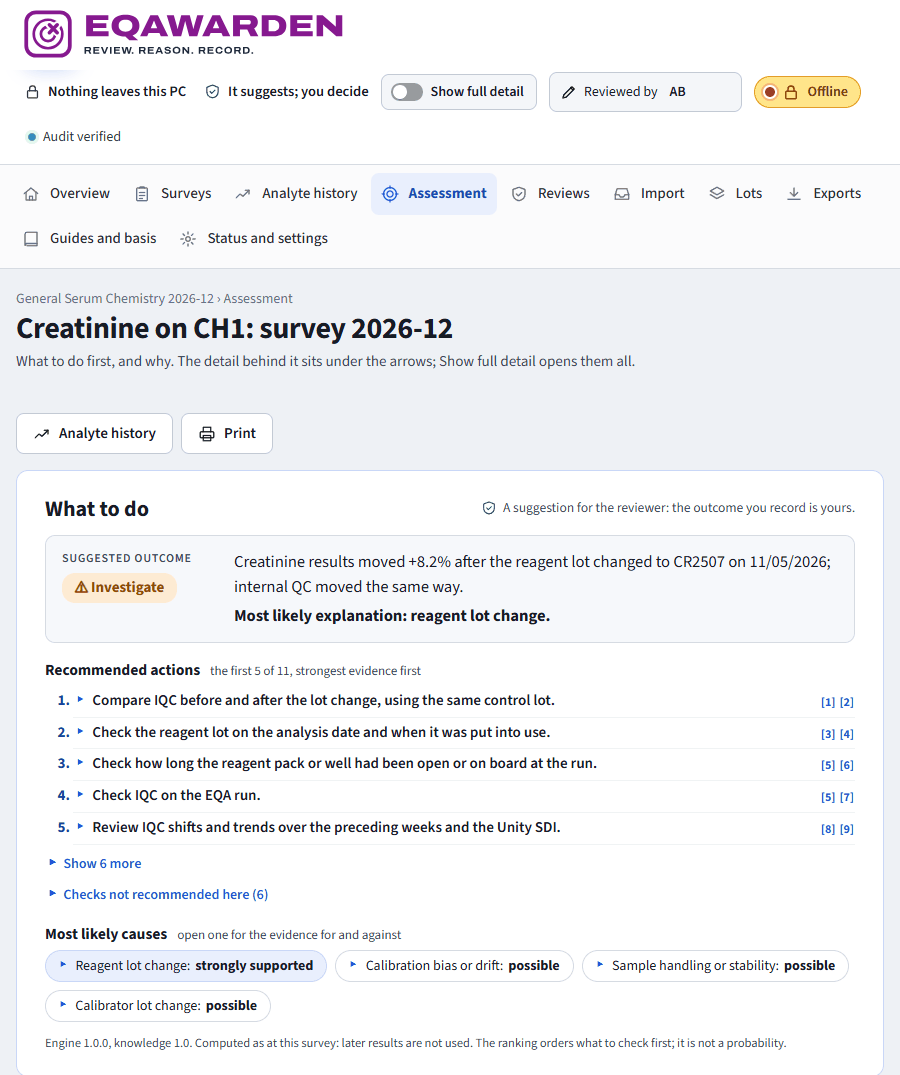
What to do first, and why.
Open a flagged result and the page leads with the decision, not the statistics. The detail is one arrow away for anyone who wants it.
- Suggested outcome. The first of four fixed outcome rules that applies (acceptable, acceptable and monitor, investigate, corrective action) with a plain summary of why.
- Recommended actions. Drawn from the causes rated possible or better, strongest evidence first, each with its reason and its references. Checks not recommended here are listed too, so nothing is hidden.
- Most likely causes. Short chips, ranked by weighted evidence. Open one for the evidence for and against. The ranking orders what to check first; it is never shown as a probability.
- Everything behind the arrows. Results in detail, why the app suggests this, all causes considered, the full written explanation, what the assessment cannot tell you, and the references used on the page.
Then the reviewer records the outcome, the cause and a comment, and previews the record exactly as it will be written before signing with initials.
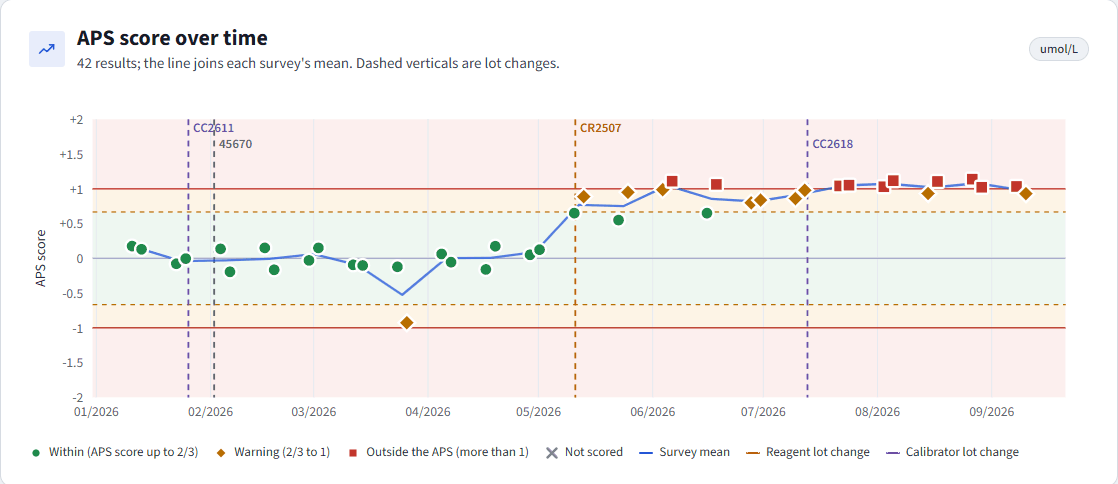
Trends, lots and IQC on one chart.
Every result for an analyte on an instrument, as an APS score over time. Dashed lines mark reagent and calibrator lot changes, so a step is visible before any statistic is read.
- Series rules. Bias with a confidence interval, sign and runs tests, drift, CUSUM and EWMA across surveys, and a cycle regression of result on target.
- Lot steps. Before and after each lot change, with a permutation test and the confidence of the lot link.
- Your method group. You, your group's median and the all-method median, sample by sample, with RCPAQAP's ranking of your SD, CV, bias and MPS.
- In short. The suggested outcome as at the latest survey, and one click through to the assessment.
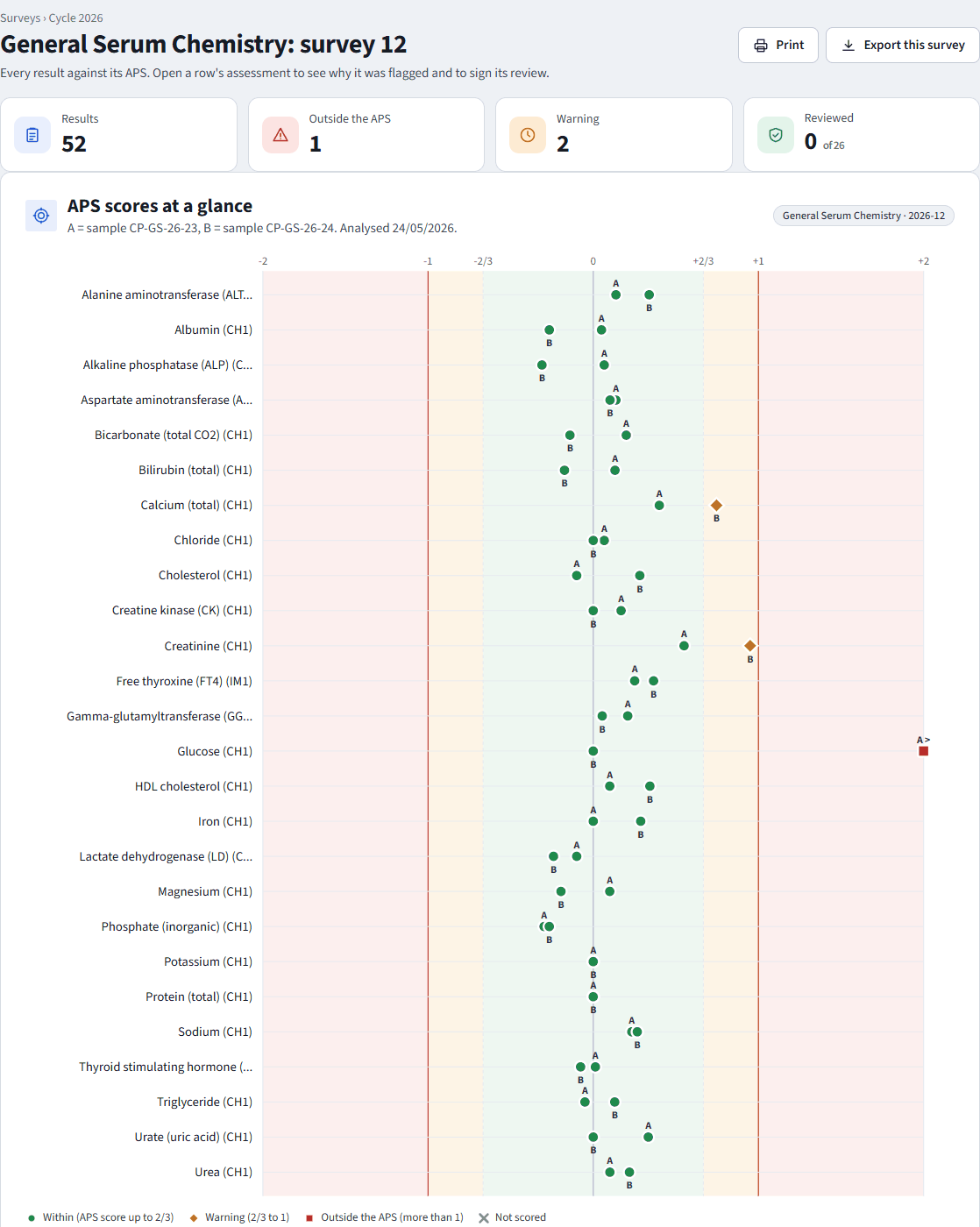
Every result in a survey, at a glance.
Each survey opens with four figures (results, outside the APS, warning, reviewed) and one chart that places every result in its zone. Open a row for its assessment; sign it; export the survey record.
- Within, warning, outside. The APS score says how much of the allowed error a result has used: up to two thirds is within, two thirds to one is a warning, above one is outside.
- Target reliability beside it. Small groups and uncertain targets are flagged rather than trusted.
- Survey-level findings. One vial shifted, both vials shifted, one instrument off, and the cross-analyte patterns are tested on every survey.
- Overview. Surveys awaiting review, results outside the APS this cycle, open investigations and trend flags, with the analytes that need attention and why.
Each flag shows its statistic, threshold, rule id and reference.
The rules are the knowledge base's, not hidden code. The thresholds a laboratory is asked to sign off before real review records are listed in one document, regenerated from the knowledge files after any change.
Outside or warning; small or uncertain targets; transcription, decimal and unit slips; sample swaps.
One vial shifted (reconstitution), both vials, one instrument off, and the cross-analyte patterns.
Bias, runs, drift, CUSUM, repeats, proportional against constant error, imprecision.
A step at a reagent or calibrator lot change, shared lots, recent or expired lots.
Does internal QC move with the EQA result, stay stable, or break Westgard rules around the run?
Your deviation or your method group's; known analyte pitfalls; correlation factors.
58 finding rules plus 4 outcome rules. RCPAQAP's own assessment stays authoritative for inside or outside the APS; EQAWarden's statistics describe patterns and never establish a cause. Read every rule, or how the statistics work.
Three ways in, one preview before anything is stored.
The whole myQAP report
Drop the survey report PDF exactly as downloaded. EQAWarden recognises its Result review and Method Comparison pages and reads every section at once, with no layout to check: your results with their method categories, APS, target source and RCPAQAP's colour; the last six surveys for each measurand; and every method group with your laboratory's ranking.
Files and pasted tables
CSV, TSV, XLSX or rows pasted from a spreadsheet. Header names are matched to known fields. A new layout is checked by you once, column by column, and remembered by its header signature, the way LotWarden learns a supplier's docket.
Preview, then store
You see what was read and how it maps to analytes, instruments and products before it is stored. A re-import archives the old records rather than deleting them, and a whole import can be undone in one step.
No OCR. myQAP reports are digital PDFs and are read as text. A scanned PDF is refused with a clear message rather than guessed at. Everything about reading the data.
Internal QC beside the EQA result.
Read from Unity's exported files. EQAWarden never connects to Unity, and never writes to it.
What is imported
- QC points. One value per row, or a block of columns per level.
- Statistics exports. Laboratory and peer mean, SD and CV.
- Events. Rule violations (1-3s, R-4s and the rest), actions and comments, typed as calibration, lot change or maintenance.
- Lots. Reagent and calibrator lots written on points become lot intervals.
Every layout is checked once, column by column, then remembered.
What it tells the reviewer
- IQC-CONCORDANTIQC moved with the EQA result: points to the analytical systemsystem
- IQC-STABLEIQC steady: points to the sample, handling or entrysample
- IQC-RULESWestgard rule violations around the runcheck
- IQC-EVENTA calibration or maintenance near the resultcheck
- IQC-PEERPeer statistics agree with the shiftcheck
The same control lot is compared before and after the analysis date, and EQA and IQC agreement is tested with a consistency statistic.
Every fact cited, every threshold in the open.
The knowledge base is built from analyser package-insert facts and the literature. Unverifiable facts are marked, and the laboratory records its own analysers, assays and correlation factors beside it.
Method, calibration, traceability, pitfalls, biological variation.
Faults that move a known set of analytes together.
Ordered checks for every cause and pattern.
Confidence-graded, cited beside every rule and check.
Patterns: one fault, many analytes
- Reaction temperature. Every enzyme activity (ALT, AST, ALP, GGT, LD, CK, amylase, lipase) moves the same way on one analyser, CK most; end-point tests do not.
- ISE module. Sodium, potassium and chloride move together on one analyser.
- Contamination. Calcium and magnesium high together; or EDTA: calcium, magnesium and ALP low with potassium high.
- Immunoassay signal. Sandwich assays low while competitive assays read high: a signal or wash fault, not a calibration.
Each pattern is measured against the analyte's usual result on that analyser, and only when the analytes outside the pattern did not move. A pattern suggests checks; it is never a cause stated as fact.
Your analysers: the laboratory's own setup
- Middleware. None, CentraLink or other. Checks that need middleware records are left out when there is none.
- Analysers and modules. Whether an assay runs on a chemistry or an immunoassay module decides which patterns it belongs to.
- Assays and correlation factors. A factor other than slope 1, intercept 0 flags that analyte's EQA results, because RCPAQAP asks for results without it.
- Calibration intervals and special washes. Kept beside the results for the reviewer.
Every change needs initials and is audited. One knowledge base serves several laboratories; each records its own analysers. The first release covers the Siemens Atellica chemistry and immunoassay modules. Explore the knowledge base.
The same assurance as LotWarden.
EQAWarden is built on LotWarden's platform: the same network guard, the same hash-chained audit log, the same sealed store and the same house rules. Assurance, records and validation in full.
Offline, enforced
Every outside connection is blocked at socket level and logged. No AI, no cloud, no web fonts, no CDN.
Sealed data
Laboratory data is encrypted at rest (AES-256-GCM). The key stays beside the app and never enters the repository.
Hash-chained audit
Imports, mappings, settings and sign-offs, each with initials. Tampering shows, and the chain is verified on every start.
Preview before write
Nothing is stored until a person confirms it. Re-imports archive; nothing is ever deleted.
Transparent and honest
Every flag shows its numbers, rule and reference. Small-n limits are stated, never hidden.
Validated
Fictional fixtures, golden scenarios and automated checks run before every build; component versions and hashes are recorded, and each release carries a validation dossier.
From the zip to the first signed review.
A single folder on a Windows PC. Unzip it, run it, and the page opens in your browser. The laboratory's data, audit logs and key stay beside the program.
- STEP 1
Run it
Unzip and run EQAWarden.exe. The page opens at 127.0.0.1:5760 on this computer only.
- STEP 2
Record your analysers
Middleware, each analyser's module, its assays and any correlation factors.
- STEP 3
Import history
A few myQAP survey reports (each brings the last six surveys), Unity exports and LotWarden lots.
- STEP 4
Confirm mappings
Analyte, instrument and product names the first time they appear.
- STEP 5
Review a survey
Open the assessment. Start with What to do; open an arrow for the evidence.
- STEP 6
Sign
Record the outcome with initials. Export the survey record for NATA evidence.
Before real review records, the laboratory signs off EQAWarden's own thresholds and weights. Try it first on the fictional demo year, which is marked DEMO throughout. EQAWarden is completing validation for its first release; evaluation copies are available to accredited laboratories now.
It suggests; people decide.
A 20-minute screen-share walks a real reviewer through a demo survey, an assessment and a signed record. The outcome, and the signature, stay with the reviewer.